HOA Contract Management Tool
Why It Matters
You Find Out After
the Deadline Has Passed.
A community association contract renews because the window to give notice closed while the agreement was sitting in an email thread. Nobody made a decision. The board discovers it a year later, usually while asking a different question, and the association is committed for another term at a price nobody tested.
The Notice Deadline
The Date That Matters Is Not
the Renewal Date.
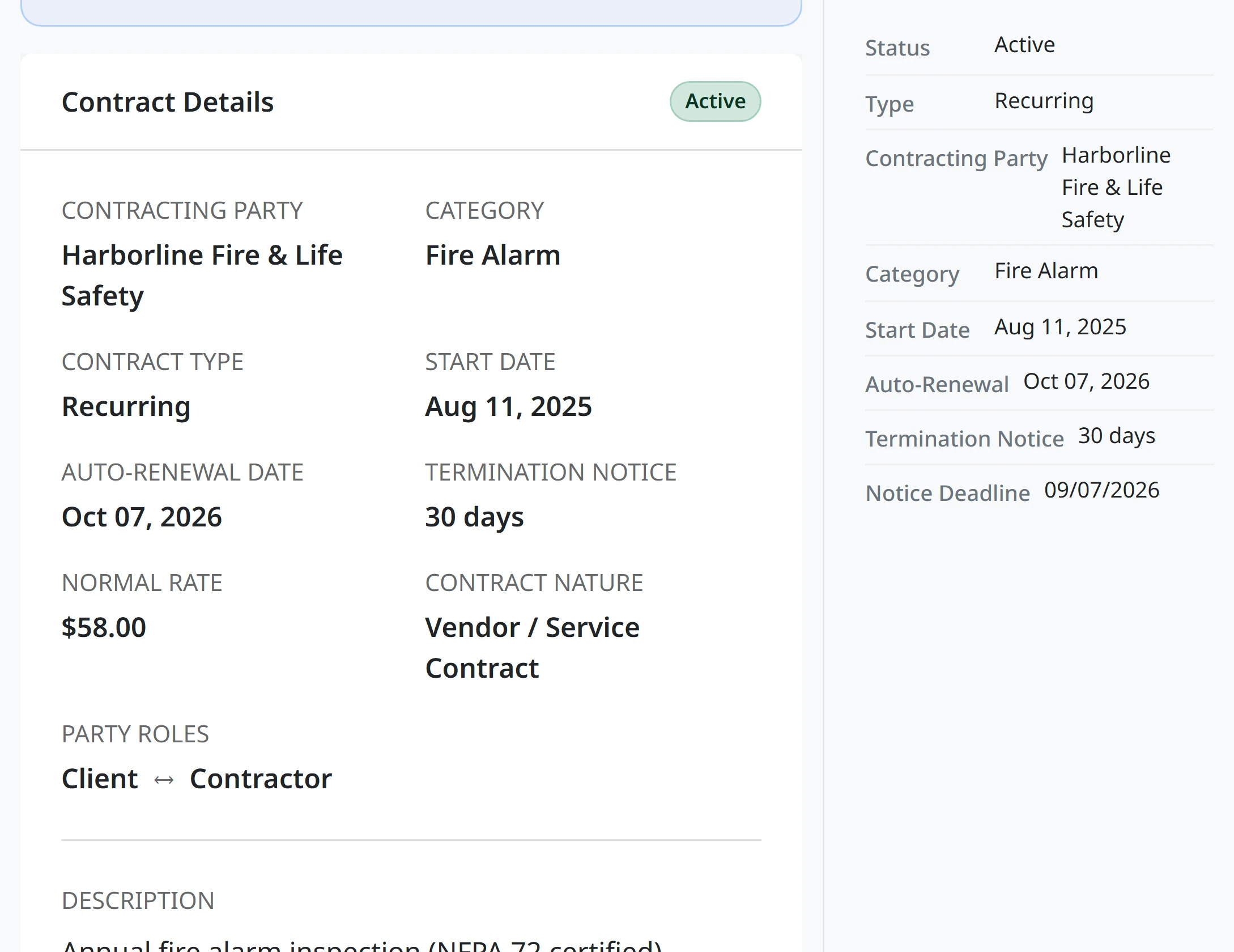
It is the last day you can stop the renewal, and it is different for every agreement. Upload the contract and ResLife pulls out the renewal date and the notice period, taking the one the association has to give when each side is held to a different number, then counts backwards and puts that date on the record.
The renew-or-terminate decision reaches you while you can still make it, rather than arriving as a question about why you are committed for another year.
Terms are read out of the document by a language model and land as structured fields you can check and correct. Nothing is decided on your behalf.
Awarding the winning bid
- You Award the bid.
- ResLife Reads the three ceilings out of your governing documents.
- ResLife Tests the term against the longest a contract may run.
- ResLife Tests the value against what the board may approve alone.
- ResLife Tests it against the competitive bidding threshold.
- ResLife Reports each as within the limit, or needing a member vote.
One step yours. Five checks before it stands.
Where the ceilings come fromYour Own Limits
The Award Checks Itself.
Three ceilings are read from your association’s governing documents and applied to the award in front of you: the longest term a contract may run, the value the board can approve without a member vote, and the amount above which competitive bidding is required. Each reads back as within the limit or needing action, with the real figures rather than a warning symbol. The limits themselves live in ResLife Compliance.
Signed documents file themselves into the vendor’s folder, so the next person to ask what was agreed does not start in somebody’s inbox.
Contracts arrives with ResLife Maintenance and is switched on per association alongside work orders and bidding. You are not obliged to use the rest of it.
What You Stop Carrying
No Deadline Lives
Only in Your Head.
You stop keeping a mental list of which agreements are creeping toward renewal. When the board asks what the association is committed to and until when, the answer is already assembled.
What Managers Ask About Association Contracts.
How do I stop an HOA vendor contract from auto-renewing?
By giving notice before the contract’s own notice deadline, which is the renewal date less the notice period the agreement requires from the association. ResLife reads both out of the document, works out that date, and brings the decision to you before it passes.
When does a community association contract need a member vote?
It depends on the association and on your state. ResLife resolves the threshold from your governing documents and shows the real figure beside the contract value, along with the maximum term allowed and the amount above which competitive bidding is required.
How is this different from keeping contracts in a shared drive?
A shared drive holds the file. It does not know when the notice window closes, whether the term exceeds what your documents allow, or that the renewal you are about to let happen was never actually decided.
Find Out Which Contracts
Are About to Renew.
Load the agreements you already have and see the deadlines you did not know you were carrying.